
vue项目打包部署后页面是空白的,以及部署之后页面能看到图片等资源找不到
君哥
阅读:3025
5年前
评论:0
第一个:vue项目打包部署后页面是空白的
因为index.html里边的内容都是通过script标签引入的,而你的路径不对,打开是空白的。
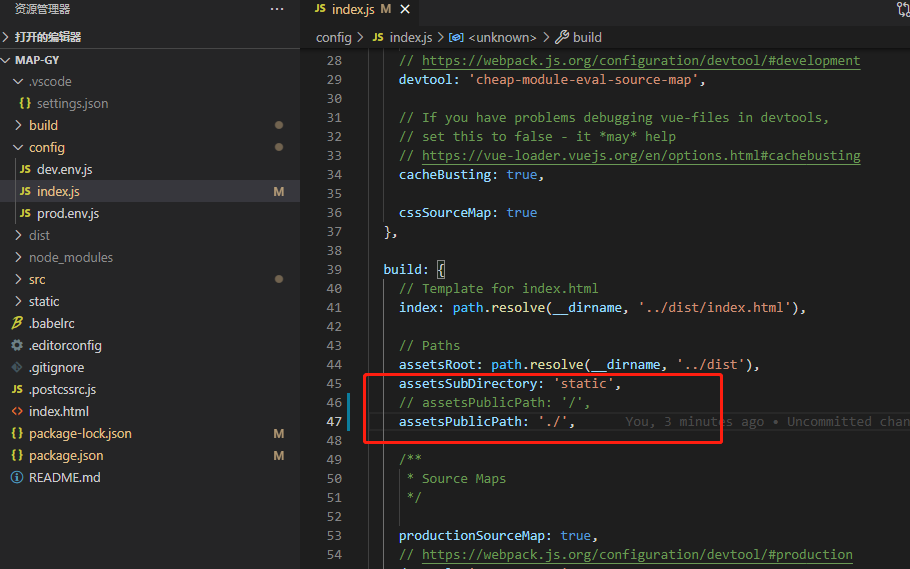
解决办法:config文件夹下的index.js文件的build中assetsPublicPath
assetsPublicPath默认的是 ‘/’ 也就是根目录。而我们的index.html和static在同一级目录下面。 所以要改为 ‘./ ’;
再次执行 npm run build 就可以了。
第二个:部署之后页面能看到图片等资源找不到
解决办法:build文件夹下的utils.js文件的generateLoaders方法加上publicPath: '../../'

打包完成后配置会自动生成vue.config.js文件
const path = require("path");
const resolve = function(dir) {
  return path.join(__dirname, dir);
};
module.exports = {
  publicPath: process.env.NODE_ENV === "production" ? "./" : "./",
  outputDir: "dist",
  assetsDir: "static",
  lintOnSave: true, // 是否开启eslint保存检测
  productionSourceMap: false, // 是否在构建生产包时生成sourcdeMap
  chainWebpack: config => {
    config.resolve.alias
      .set("@", resolve("src"))
      .set("@v", resolve("src/views"))
      .set("@c", resolve("src/components"))
      .set("@u", resolve("src/utils"))
      .set("@s", resolve("src/service")); /* 别名配置 */
    config.optimization.runtimeChunk("single");
  },
  devServer: {
    // host: "localhost",
    /* 本地ip地址 */
    //host: "192.168.1.107",
    host: "0.0.0.0", //局域网和本地访问
    port: "8080",
    hot: true,
    /* 自动打开浏览器 */
    open: false,
    overlay: {
      warning: false,
      error: true
    },
    /* 跨域代理 */
    proxy: {
      "/api": {
        /* 目标代理服务器地址 */
        target: "http://m260048y71.zicp.vip", //
        // target: "http://192.168.1.102:8888", //
        /* 允许跨域 */
        changeOrigin: true,
        ws: true,
        pathRewrite: {
          "^/api": ""
        }
      }
    }
  }
};
相关文章




发表评论